

Ecommerce has never been more competitive. Shoppers expect fast, intuitive, trustworthy experiences—and if they don’t get them, they click away in seconds.
The good news: you don’t need hundreds of bells and whistles to win. You need the right ecommerce website features, implemented well.
In this guide, you’ll find a practical ecommerce features list of 29 must-haves that improve traffic, conversions, and customer lifetime value. We’ll also cover how to use the “add me to search link” concept strategically so your brand and key people show up prominently in Google.
Let’s walk through the essential features of an ecommerce website, with clear examples and tips you can apply right away.
1. Clear Brand Identity & “Add Me To Search” Visibility

Before navigation, product pages, or checkout, customers need to recognize and trust you.
That starts with:
• A clear logo and brand colors
• A tagline or short statement that says who you are and what you sell
• Consistent design across every page
• Easy-to-find contact details and social proof
But visibility doesn’t end on your site. You want key people and your brand to show up directly in Google.
Using an “add me to search link” strategy:
• For individual experts (owners, founders, key creators), you can use the Google “People Card” feature (available in select regions). When someone searches your name, they see a knowledge-style card with your name, photo, links, and a short bio.
• For businesses, optimize your Google Business Profile and structured data so your store, reviews, and FAQs show up in rich search results.
Tips to implement:
• Create a prominent “About” section and link it in your top and footer navigation.
• Add a “Find us on Google” or “View our profile” link that takes users to your Google Business Profile or brand knowledge panel if available. This is your practical version of an “add me to search link” for your ecommerce brand.
• Use consistent business name, address, and phone (NAP) everywhere online.
Result: more trust, better CTR in search, and stronger brand recall.
2. User-Friendly Navigation & Menus

If customers can’t find products quickly, they leave.
Core ecommerce website features for navigation include:
• Logical product categories and subcategories
• Clear labeling based on how real customers shop (by use, by style, by solution)
• Sticky or fixed navigation on desktop and mobile
• A visible “Shop” menu for your main categories
Real-world example: A clothing store might organize navigation as:
Women | Men | Kids | New | Sale | Brands | Gift Cards
Within “Women,” subcategories break down to Tops, Dresses, Jeans, Activewear, etc. This mirrors how people think, not how your internal systems are structured.
Best practices:
• Put your most popular categories first.
• Avoid cluttered mega-menus with too many nested levels.
• Test every menu on mobile devices where screen space is limited.
3. Breadcrumbs For Clarity

Breadcrumbs show users where they are and help them move back up your site structure.
Example breadcrumb:
Home > Women > Dresses > Maxi Dresses
Why they matter:
• Faster navigation: Users can jump back one or two levels without hitting “back” repeatedly.
• SEO benefits: Breadcrumbs give search engines a clear hierarchy of your categories and product relationships.
• Reduced bounce: People stay longer when they don’t feel lost.
Implement breadcrumbs on:
• All category pages
• All product pages
• Any deep content pages (guides, style hubs, etc.)
4. Powerful Site Search

Internal search is one of the most valuable ecommerce features. Shoppers who search typically have strong purchase intent.
Must-haves:
• A visible search bar on every page
• Autocomplete suggestions for products, categories, and brands
• Handling of misspellings and synonyms (e.g., “sneeker” returns “sneaker” products)
• Search results that can be filtered by price, size, color, rating, etc.
Example: A customer searches “black running shoes size 10.” A strong search feature returns relevant products, lets them filter by brand, price, or material, and clearly shows what’s available in their size.
Pro tip: Analyze search logs to find new keyword opportunities and discover products or content users expect but you’re not offering or not surfacing well.
5. Smart Product Filters
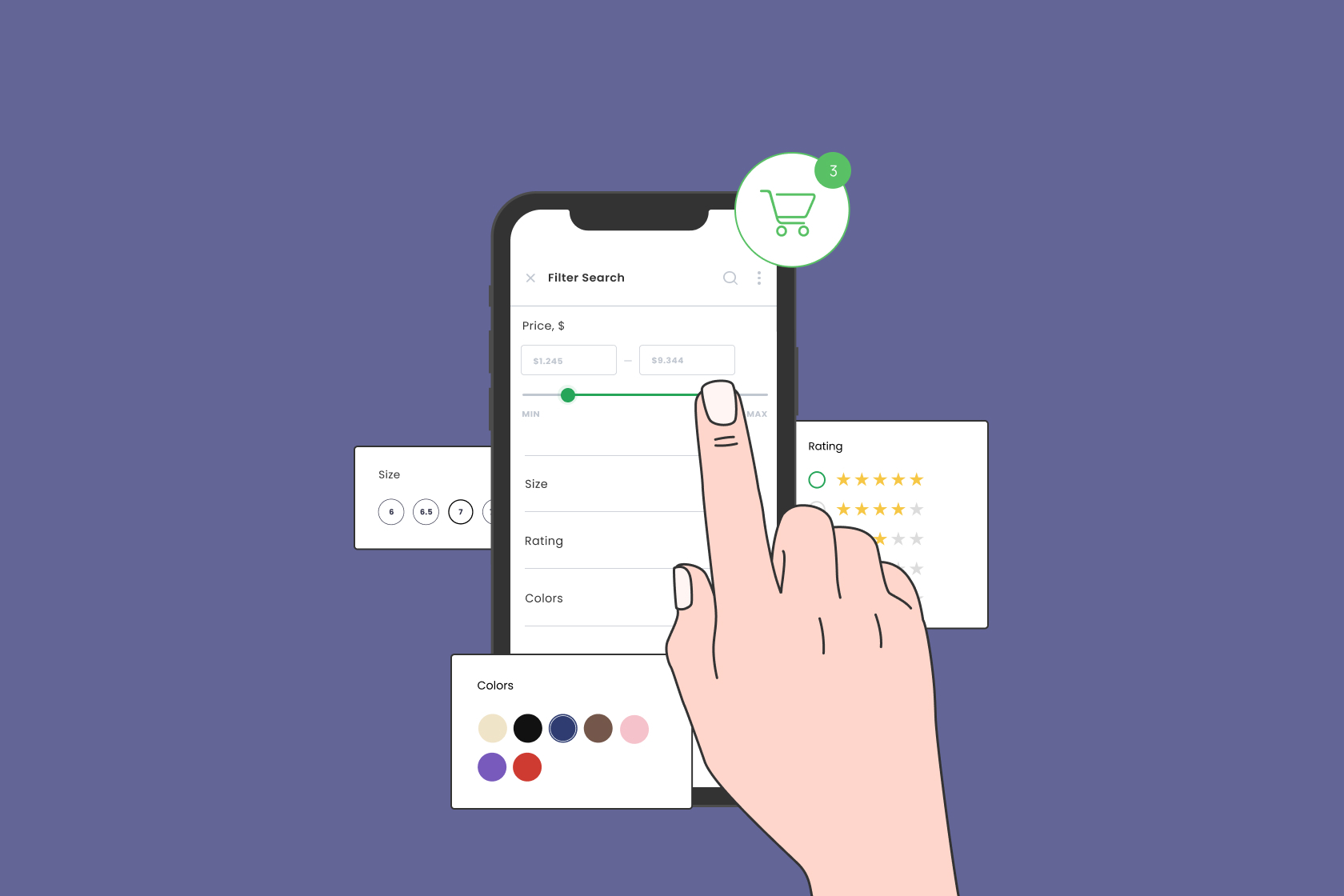
Filters are non-negotiable for stores with more than a few dozen products.
Common filter options:
• Size, color, material
• Price range
• Brand
• Ratings
• Availability (in stock, pickup today, delivery options)
• Special tags (eco-friendly, best-seller, limited edition)
Why filters matter:
• They reduce friction in the buying journey by cutting down irrelevant options.
• They keep shoppers on your site longer instead of returning to Google.
• They directly boost conversions by helping users find exactly what fits their needs.
For SEO: properly structured filters can help create targeted landing pages (e.g., “men’s waterproof hiking boots size 11”) without creating thin or duplicate content.
Also Read: BCG Matrix of SBI
6. High-Converting Homepage Hero
Your homepage is often the first touchpoint and must answer:
• Who are you?
• What do you sell?
• Why should someone trust and buy from you?
Key homepage elements:
• Strong hero section with a clear headline and a primary call-to-action (e.g., “Shop New Arrivals”)
• A short value proposition (free shipping, easy returns, ethical sourcing, etc.)
• Visuals that show people using your products in real-life contexts
• Key trust signals: reviews, media mentions, security badges
Avoid generic stock photography and vague headlines like “Welcome.” Be specific: “Performance running shoes engineered for everyday athletes.”
7. Strategic Footer Navigation
The footer is an underrated place for critical ecommerce website features.
Include:
• Links to top categories and best sellers
• Customer service pages (FAQ, Shipping, Returns, Contact)
• About, Careers, and Press pages
• Social media links
• Your privacy policy, terms and conditions, and cookie policy
From an SEO standpoint, the footer helps search engines discover and understand important internal pages and site structure.
8. Rich Product Pages
Product pages are where intent becomes revenue. They should be built for both humans and search engines.
Essential ecommerce features on product pages:
• Clear product name (including important keywords)
• Concise, benefit-driven product description
• Detailed specs: size, material, ingredients, dimensions, care instructions
• High-quality images from multiple angles, with zoom and lifestyle shots
• Product videos (if possible) demonstrating features or unboxing
• Price, discounts, stock status, and estimated delivery times
• Size guides or fit information where relevant
• Clear “Add to Cart” button above the fold
Example: A camping tent product page might include capacity, weight, packed size, waterproof rating, setup time, and photos of the tent in use at a campsite.
This level of detail reduces returns and increases buyer confidence.
9. Product Videos That Sell
Video is one of the most powerful ecommerce features for conversions.
Effective product video ideas:
• Quick 30–60 second overview highlighting key features
• How-to-use demos
• Comparison videos between two similar models
• Close-ups of important details (mechanisms, texture, features)
Benefits:
• Higher time-on-page – a positive engagement signal
• Fewer product misunderstandings and returns
• Stronger emotional connection (especially for lifestyle or fashion items)
10. Product Comparisons
When you sell multiple similar items, customers need help choosing.
Comparison tools should allow shoppers to:
• Select two or more products
• Compare features side-by-side (specs, price, size, color, key benefits)
• View ratings and reviews for each
This is especially powerful for categories like electronics, home appliances, tools, and sporting goods.
Result: Fewer abandoned carts due to “I’ll decide later” paralysis and more confident purchasing.
11. Ratings & Reviews Engine
Social proof is one of the strongest features of an ecommerce website.
Key elements of a strong review system:
• 1–5 star rating summary
• Written reviews that can be sorted by most recent, most helpful, or by rating
• Verified purchase badges
• Optional photo and video uploads from customers
• Easy review submission (ideally driven by post-purchase emails or SMS)
Benefits:
• Increased trust and conversion rates
• SEO benefits from fresh user-generated content and long-tail keywords
• Insight into product issues and opportunities for improvement
Tip: Make sure you also show review snippets on category pages and search results within your site, not just on the product page.
12. FAQs on Product Pages
FAQs answer pre-purchase questions, reduce support tickets, and add keyword-rich content.
Good FAQ topics:
• Sizing and fit
• Compatibility (for electronics or accessories)
• Materials and ingredients
• Warranty and returns on this specific product
• Usage limitations or care instructions
Example: A skincare product page might include FAQs like:
• “Is this safe for sensitive skin?”
• “Can I use this while pregnant?”
• “How long before I see results?”
These FAQs often mirror the exact questions users type into search engines, making them great for SEO.
13. Simple, Fast Checkout
Complicated checkout processes kill conversions.
Essential ecommerce checkout features:
• Guest checkout (no mandatory account creation)
• Minimal fields required (auto-fill where possible)
• Progress indicator (Step 1: Shipping, Step 2: Payment, Step 3: Review)
• Visible order summary at all times
• Clear shipping options and costs upfront
• Easy editing of cart items (size, quantity, color) without leaving checkout
Reduce friction by eliminating surprise fees late in the process. Be transparent and clear.
14. Multiple Payment Options
Shoppers have strong preferences around how they pay.
Common options:
• Credit/debit cards
• Digital wallets (PayPal, Apple Pay, Google Pay)
• Buy Now, Pay Later services (Klarna, Afterpay, Affirm)
• Local payment methods depending on the market
Benefits:
• Higher conversions, especially on mobile
• Fewer abandoned carts at the payment step
• More trust among users who prefer a specific provider
Make sure all payment options are clearly visible with recognizable logos.
15. SSO & Easy Account Creation
Many users want an account for order history and tracking, but they don’t want the hassle of new passwords.
Single sign-on (SSO) lets users sign up / log in using:
• Google
• Apple
• Facebook or other networks (where appropriate)
Benefits:
• Faster checkout for repeat buyers
• More accurate customer data and saved preferences
• Less friction and fewer abandoned signups
Just don’t force account creation at the wrong moment. Offer it as a helpful option.
16. Robust Help Center
A dedicated Help or Support Center centralizes information and reduces repetitive questions.
Include articles or FAQs on:
• Ordering and payments
• Shipping and delivery times
• Returns and refunds
• Account management
• Product care and warranties
• Data privacy and security
This is both a user experience and SEO win: well-structured help content often ranks for support queries your customers are Googling.
17. Order Tracking
Once customers buy, they want to know: “Where is my order?”
Key ecommerce features for tracking:
• Order tracking page accessible via top nav or footer
• Lookup by order number + email (no login required)
• Clear status: processing, shipped, out for delivery, delivered
• Link to the courier’s tracking page
Make tracking links easy to find in order confirmation emails and account dashboards.
18. Mobile-Friendly Design
More than half of ecommerce traffic comes from mobile devices in many niches.
Your ecommerce website features must work perfectly on smaller screens:
• Responsive layout that adapts to all sizes
• Large, tappable buttons and enough spacing
• Fast load times (compressed images, efficient code, use of caching)
• Mobile-optimized product galleries and filters
• Mobile-friendly checkout (saved details, digital wallets)
Test on real devices, not just in a browser window.
19. Mobile App (When It Makes Sense)
A mobile app isn’t mandatory, but it can be powerful for:
• Frequent shoppers
• Subscription-based brands
• Loyalty programs
Benefits:
• Persistent presence on a user’s home screen
• Push notifications for offers and new arrivals
• Easier, faster repeat purchases with saved details
If you do build an app, make sure your website actively promotes it—and your app actively deep-links back to relevant web content for SEO.
20. Email & SMS Opt-In Everywhere
Not every visitor will buy on their first visit. But if you capture their contact details, you can bring them back.
Effective list-building tactics:
• Email/SMS signup offers (e.g., 10% off first order)
• Exit-intent popups when someone moves to close the tab
• Persistent signup in header or footer
• Post-checkout opt-in checkbox for marketing messages
Make sure you:
• Clearly state what users will receive (discounts, early access, helpful tips)
• Respect regional regulations like GDPR and TCPA
• Segment your list for more relevant messaging (new vs returning customers, product interests, etc.)
21. Push Notifications (Web or App)
Push notifications (via your app or web browser) are a powerful channel to bypass crowded inboxes and social feeds.
Use them for:
• Flash sales and limited-time offers
• Stock-back-in notifications
• Price drop alerts for wishlisted items
• Shipping updates
Be selective—too many notifications lead to opt-outs. Focus on high-value, time-sensitive messages.
22. Chat & Chatbots
Real-time support is one of the best ecommerce features for improving trust and speeding up purchases.
Your chat solution can offer:
• Instant answers to FAQs (shipping times, return policies, stock)
• Product recommendations and guidance
• Easy connection to a live human agent when needed
Important:
• Clearly label when a user is speaking to an automated assistant vs. a human.
• Keep replies accurate and concise.
• Escalate to human support quickly for anything complex, pricing-sensitive, or emotional (complaints, refunds).
23. Coupons & Deals
Shoppers often search “brand name + offer code” before buying.
Own this experience:
• Create a dedicated “Offers” or “Promo Codes” page on your website.
• Highlight current deals, bundle offers, and loyalty perks.
• Promote free shipping thresholds (e.g., “Free shipping over $50”).
This keeps users on your site instead of sending them to coupon aggregators that may distract them or send them to competitors.
24. Special Discount Programs
Consider special pricing for:
• Students
• Military and veterans
• Teachers
• First responders
• Healthcare workers
Clearly advertise these on your homepage, relevant product pages, and checkout. These programs build goodwill and can be a compelling differentiator for big-ticket purchases.
25. Wishlists
Wishlists are simple but powerful ecommerce features.
Benefits:
• Shoppers can save items they like without committing immediately.
• You can send reminder campaigns or “Your wishlist item is on sale” messages.
• Friends and family can buy from someone’s wishlist for birthdays and holidays.
Make it easy to:
• Add to wishlist with one click (heart icon, “Save” button)
• View and manage wishlist from account pages
• Share wishlist via link or email
26. Gift Registries
Gift registries work like advanced wishlists tied to specific occasions:
• Weddings
• Baby showers
• Housewarming parties
• Holidays or personal milestones
Why registries matter:
• They bring in new-to-brand shoppers who buy gifts.
• They typically increase average order value as people buy from a set list.
• They encourage larger household or long-term relationships with your store.
If your catalog fits events (homeware, baby, fashion, electronics), registries can be a serious growth lever.
27. Multilingual & Multi-Currency Support
If you serve international audiences, localized ecommerce features are essential:
• Multiple languages with properly translated content
• Multiple currencies with clear pricing
• Local payment and shipping options
• Hreflang tags and local SEO best practices
Example: An EU-based brand might provide English, French, German, and Spanish variants with automatic language suggestions based on a user’s location or browser settings.
This massively increases trust and reduces friction for non-English speakers.
28. Privacy, Security & Data Policies
Trust is a non-negotiable ecommerce feature.
Your site should:
• Use HTTPS on every page
• Show recognizable security badges (from legitimate providers) at checkout
• Clearly explain cookies and tracking (via banner and policy page)
• Offer a straightforward privacy policy and terms of service
• Comply with relevant regulations (GDPR, CCPA, etc.)
A clear, accessible personal data policy helps hesitant customers feel safer about creating accounts and saving payment details.
29. Loyalty & Affiliate Programs
To maximize customer lifetime value, encourage repeat purchases and word-of-mouth.
Two powerful ecommerce features:
1. Loyalty Program
• Earn points per dollar spent
• Reward tiers (silver, gold, platinum)
• Birthday gifts or anniversary rewards
• Early access to sales and launches
2. Affiliate or Creator Program
• Give influencers, creators, or customers unique referral links or codes
• Offer commissions on sales they refer
• Provide creatives and banners for them to use
This not only builds a loyal base of repeat shoppers but also turns your best customers into advocates who generate new traffic and sales.
Bringing It All Together: Your Ecommerce Features Blueprint
The most successful ecommerce sites aren’t the ones with the most flashy tools—they’re the ones that remove friction at every step:
• Finding your brand in search (with strong profiles and “add me to search” style links to your Google presence)
• Discovering products via intuitive navigation, search, and filters
• Understanding products through rich pages, reviews, and FAQs
• Buying quickly and securely through simple checkout and trusted payments
• Getting help and updates easily with support centers, order tracking, and notifications
• Coming back again thanks to wishlists, loyalty programs, and relevant offers
Use this ecommerce features list as a checklist. Start with the basics (navigation, product pages, checkout, trust), then layer in advanced features based on your customers’ behavior and your growth goals.
FAQ
Q1. What are the most important features of an ecommerce website for beginners?
For a new store, prioritize: user-friendly navigation, internal site search, clear product pages with strong images, simple checkout with multiple payment options, basic reviews, and visible contact and policy pages. These cover the core user journey from discovery to purchase.
Q2. How does the “add me to search link” relate to ecommerce?
“Add me to search” typically refers to getting a personal or brand profile to appear prominently in Google (through People Cards in certain regions or optimized business profiles). For ecommerce, linking to your Google Business Profile or official search presence helps users recognize and trust your brand, increases click-through rates, and strengthens your overall search visibility.
Q3. Which ecommerce features have the biggest impact on conversions?
The largest conversion levers are usually: fast load speed, mobile optimization, transparent pricing and shipping, clear product information, strong reviews and ratings, a simplified checkout, and multiple payment options. Features like coupons, push notifications, and wishlists then help recover and nurture hesitant buyers.
Q4. How many ecommerce features should I implement at once?
Focus first on making the core shopping journey smooth: homepage, navigation, search, categories, product pages, cart, and checkout. Once those perform well, add features like loyalty programs, registries, push notifications, and chat in phases. Test each addition to ensure it improves, not complicates, the experience.
Q5. How do ecommerce features affect SEO?
Search engines favor sites that serve users well. Features like internal search, breadcrumbs, structured navigation, detailed product descriptions, FAQs, reviews, and help centers all create richer content and better internal linking. This improves crawlability, relevance, and user engagement—key signals that can help your rankings.
Q6. Do I need a mobile app if my website is already mobile-friendly?
Not necessarily. A well-optimized mobile site is enough for many brands. Consider a mobile app if you have frequent repeat purchasers, a strong loyalty program, or complex features (like advanced personalization) that benefit from an app experience and push notifications.
Use these answers to guide your roadmap, but always validate with data from your own analytics and customer feedback. The best ecommerce website features are the ones that make your specific customers’ lives easier and your business more profitable.